










Five Nights at Freddy's
Clickteam USA LLC
Category
Horror
Installs
10M+
Rating
Everyone
Updated
Jul 20, 2026
Category
Horror
Developer
Clickteam USA LLC
Installs
10M+
Rating
Updated
Jul 20, 2026
Privacy Policy
View Policy
Gallery
4 shots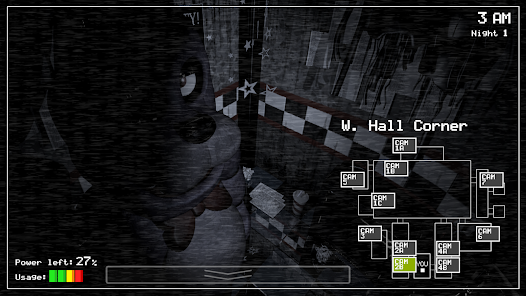
Game Overview
Classic Psychological Horror & Resource Management Thriller
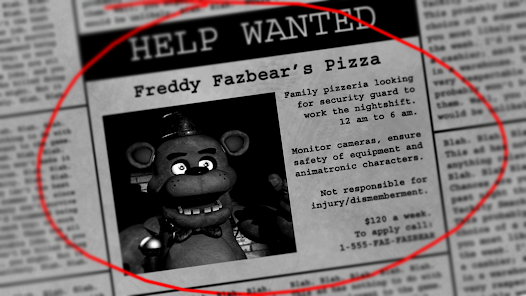
Immerse yourself in a suspenseful tactical horror experience as you accept the night shift at Freddy Fazbear's Pizza, a popular family restaurant where the beloved animatronic mascots morph into terrifying stalkers after hours 😱. Keep a vigilant eye on the security monitor network, manage your structural defenses, and stay alive from midnight until 6 AM as deadly animatronic characters hunt for you through the dark corridors.
Masterful Suspense & Critical Decisions
Rely on sharp observation and careful resource allocation rather than reflex-driven actions. Every time you check a security feed, activate a hallway light, or secure a protective blast door, you drain a shared emergency power reservoir. Run out of electricity, and you will be left completely defenseless in the dark against the main animatronic.
Distinctive AI Behavior Profiles
Study the individual operational patterns of the four main mechanical entities: Freddy, Bonnie, Chica, and the elusive Foxy. Each tracking asset utilizes specific pathways, distinct sound cues, and escalating aggression levels that require adaptive survival strategies as the week progresses.
Deep Lore & Haunting Atmosphere
Uncover the tragic history and cryptic occurrences behind the pizzeria's cheerful facade. The claustrophobic office environment, vintage audio design, and sudden jump-scares create a gripping tension that sets the standard for modern indie survival horror.
How It Works
Security Guard Night Shift Survival Protocol
Your objective as the night shift security officer is to survive from 12 AM to 6 AM across five increasingly difficult consecutive nights. Protect your office from invading animatronics by managing the security console, hallway lights, and motorized doors while conserving your finite backup battery grid 👻.
Office Interface Layout Analysis
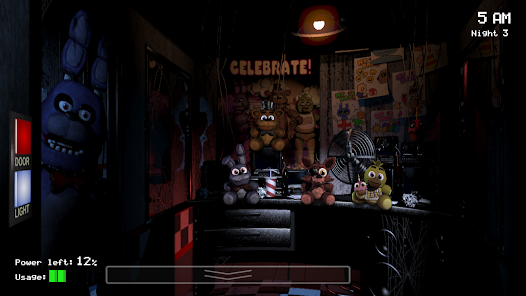
Familiarize yourself immediately with your security workspace. The red buttons on either side actuate the left and right security doors, while the white buttons activate the corresponding external hallway lights to reveal hidden threats.
Monitoring the Closed-Circuit Camera Network
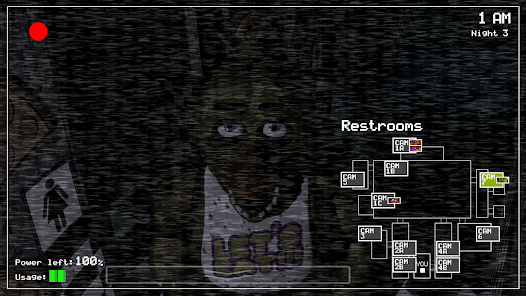
Tap the tab at the base of your screen to activate the surveillance monitor. Toggle through various rooms (Show Stage, Dining Area, Pirate Cove, East/West Halls) to track the positions of the moving animatronics.
Defensive Power Allocation Strategies
Your auxiliary power percentage drops continuously and accelerates with every asset used (doors shut, lights on, monitor active). Keep usage to an absolute minimum. Never leave doors closed or lights burning unless a threat is actively confirmed nearby.
Defending Against Specific Animatronic Tactics
- Bonnie & Chica: Check the left and right hallway lights frequently. If you see them peering through the window, press the door button immediately to shut them out. - Foxy: Monitor Cam 1C (Pirate Cove) regularly to prevent him from sprinting down the West Hall. If he is missing from the camera, drop the monitor and shut the left door instantly. - Freddy: Listen for his distinct deep laughter, which signifies his progression toward your right-hand entrance. Keep doors secure when he is nearby.
Managing Audio Cues and Visual Indicators
Pay close attention to panning audio footsteps, clanging pots in the kitchen feed (Cam 6), and warning signs on your power meter. Sound indicators often tell you when an animatronic has relocated without needing to open your monitor.
Pushing Through to 6 AM Graduation
If your power reaches zero percent, the facility will shut down completely. Freddy will appear at the left entrance playing a chime. Remain perfectly still and do not interact with anything to stretch out the remaining seconds before the clock chimes 6 AM to complete the shift 🎉.